2025. 3. 16. 13:06ㆍBackend/Spring

🦜지난번에 Json을 공부하면서, Google Protocol Buffers와 Apache Avro에 대해 잠깐 이야기한 적이 있었습니다.
[Spring] JSON : Jackson, Gson
📝회사에서 업무를 하면서 JSON을 굉장히 많이 다루고 접하게 된다. 따라서 JSON을 다루고 싶어 글을 작성하게 되었다. JSON 이란? JSON(JavaScript Object Notation)은 사람이 읽을 수 있고 시스템에서 구
gw-sheep.tistory.com
때마침 제가 맡은 서비스에서 다루는 기술 중 하나가 Protocol Buffers 이기에, 해당 내용을 공부하여 글을 작성해보려고 합니다.
Protocol Buffers란?
Protocal Buffers(이하 'Protobuf') 는 언어와 플랫폼에 중립(독립)적이며 확장 가능한 메커니즘으로 직렬화하여 구조화된 데이터를 다루고 있습니다. Protobuf는 xml보다 작고 빠르며 단순합니다.
Protocol buffers are Google’s language-neutral, platform-neutral, extensible mechanism
for serializing structured data – think XML, but smaller, faster, and simpler
그렇다면 Protobuf를 왜 사용할까요???
Protobuf는 바이너리 형식으로 구성되어 있어, 직렬화와 역직렬화가 굉장히 빠릅니다. 또한 Protobuf 파일을 다양한 언어에서 사용이 가능한데요! 문서에서 다루고 있는 언어를 확인했을 때, C++, C#, Dart, Go, Java, Kotlin, Python 가 있었습니다. 그리고 클라이언트와 서버가 약속된 스키마를 기반으로 데이터 구조를 통일하여 사용합니다. 따라서 잘못된 데이터가 전달되는 문제를 방지할 수 있습니다.
참고로 이 글을 Windows 11, Spring Boot 3.4.3, Java 17 기준으로 작성되었습니다.
# 1. ProtoBuf 사용법 (.proto)
# 준비물 : 컴파일러 (참고 : https://protobuf.dev/downloads/)
Release Protocol Buffers v30.1 · protocolbuffers/protobuf
Announcements Protobuf News may include additional announcements or pre-announcements for upcoming changes. Bazel Loosen py_proto_library check to be on the import path instead of full directory...
github.com
Protobuf 문서에서 최신 버전을 찾으셔도 되고, github 링크에 접속하셔서 OS에 맞는 파일을 다운로드 하시면 됩니다.
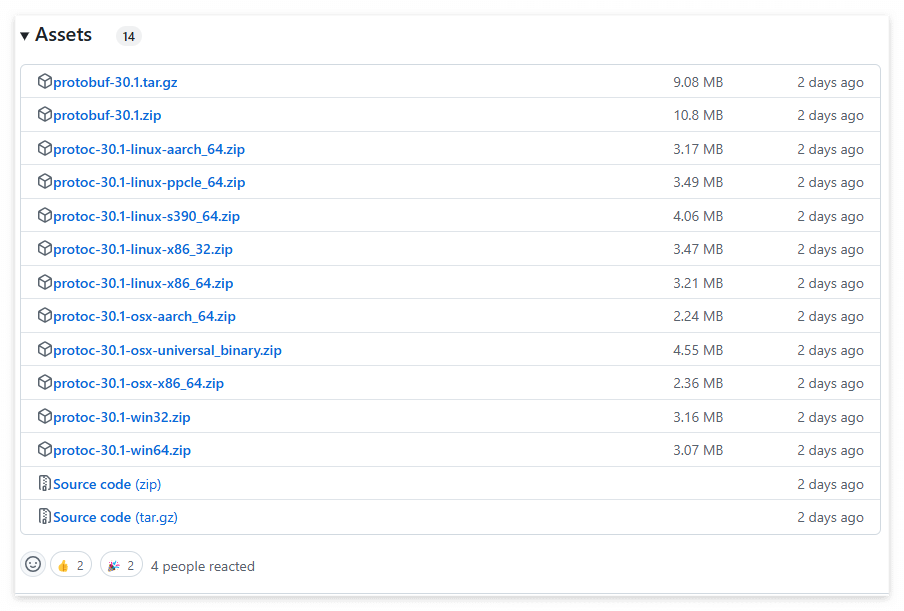
파일을 다운로드 받은 뒤에 압축을 풀어주면 다음과 같은 디렉토리와 파일들이 등장합니다
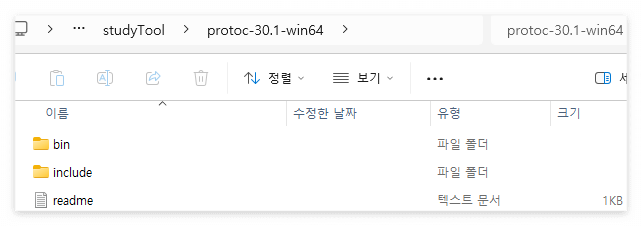
여기서 bin 폴더 안에 있는 protoc를 이용해야 하는데요!

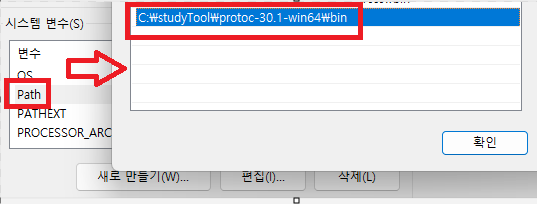
환경변수의 Path에 protoc러 경로를 추가해주시면 됩니다!
이후 windows powershell이나 cmd로 버전을 확인할 수 있는지 확인해주시면 됩니다!

# 사용
1. Build.gradle 라이브러리 추가
dependencies {
	//google protobuf
	implementation 'com.google.protobuf:protobuf-java:4.30.0'
	implementation 'com.google.protobuf:protobuf-java-util:4.30.0'

}
2. .proto 파일 작성
저는 프로젝트 내 경로 이후에 디렉토리를 하나 생성하여 작성했습니다. (src/main/proto/fruit.proto)
syntax = "proto3";

package com.practice.J;

message Fruit {
  string name = 1;
  int32 quantity = 2;
}

message Result {
  repeated Fruit result = 1;
}
3. .proto 파일 컴파일
protoc --proto_path=C:\project\(프로젝트명)\src\main\proto --java_out=C:\project\J\src\main\java C:\project\(프로젝트명)\src\main\proto\fruit.proto
그렇게 되면 프로젝트에서 새로운 java 클래스 파일이 생성됨을 확인할 수 있습니다. (이후 파일 이름을 PBProto로 변경했습니다)

4. Config && Controller
먼저 Protobuf를 활용할 수 있는 설정 파일을 생성하였습니다. 저는 WebMvC 설정을 이용하면서 추가하기 위하여, WebMvcConfigurer를 구현하는 방향으로 진행했습니다.
@Configuration
public class PBConfig implements WebMvcConfigurer {

    @Bean
    public MappingJackson2HttpMessageConverter customJackson2HttpMessageConverter() {
        return new MappingJackson2HttpMessageConverter();
    }

    @Bean
    public ProtobufHttpMessageConverter protobufHttpMessageConverter() {
        return new ProtobufHttpMessageConverter();
    }

    @Override
    public void extendMessageConverters(List<HttpMessageConverter<?>> converters) {
        converters.add(protobufHttpMessageConverter());
    }

}
이후, 프로젝트에 Json 을 Protobuf로 변환할 수 있는 controller와 Protobuf를 Json으로 변환할 수 있는 컨트롤러를 작성했습니다.
@Slf4j
@RestController
@RequiredArgsConstructor
@RequestMapping("/proto")
@Tag(name = "Proto API", description = "ProtoBuf 정적 변환 API")
public class PBProtoController {

    private final ObjectMapper objectMapper;

    @PostMapping(value = "/jsontopb", consumes = MediaType.MULTIPART_FORM_DATA_VALUE)
    @Operation(summary = "JsonToPb", description = "json을 pb로 변환해줍니다")
    public ResponseEntity<?> getJsonToPb(@RequestPart("file") MultipartFile file) {

        log.info("========== Protobuf .proto -> protoc start ==========");

        try {
            JsonNode jsonNode = objectMapper.readTree(file.getBytes());
            PBProto.Result.Builder fruitBuilder = PBProto.Result.newBuilder();
            JsonFormat.parser().merge(jsonNode.toString(), fruitBuilder);
            PBProto.Result result = fruitBuilder.build();

            return ResponseEntity.ok()
                    .header(HttpHeaders.CONTENT_DISPOSITION, "attachment; filename=fruit.pb")
                    .contentType(MediaType.APPLICATION_OCTET_STREAM)
                    .body(result.toByteArray());

        } catch (IOException e) {
            log.error(e.getMessage());
            return ResponseEntity.badRequest().body("fail to parse");
        }

    }

    @PostMapping(value = "/pbtojson", consumes = MediaType.MULTIPART_FORM_DATA_VALUE)
    @Operation(summary = "PbToJson", description = "PB을 Json로 변환해줍니다")
    public ResponseEntity<?> getPbToJson(@RequestPart("file") MultipartFile file) {

        log.info("========== Protobuf .proto -> protoc start ==========");

        try {
            byte[] pbFile = file.getBytes();
            PBProto.Result receiveMessage = PBProto.Result.parseFrom(pbFile);
            String message = JsonFormat.printer().print(receiveMessage);

            return ResponseEntity.ok()
                    .contentType(MediaType.APPLICATION_JSON)
                    .body(message);

        } catch (IOException e) {
            log.error(e.getMessage());
            return ResponseEntity.badRequest().body("failed to parse");
        }

    }
5. Postman Test
1) 먼저 임시로 json 파일을 생성합니다. (임시 : sample.json)
{
    "result": [
        {
            "name": "Apple",
                "quantity": 10
        },
        {
            "name": "banana",
                "quantity": 20
        }
    ]
}
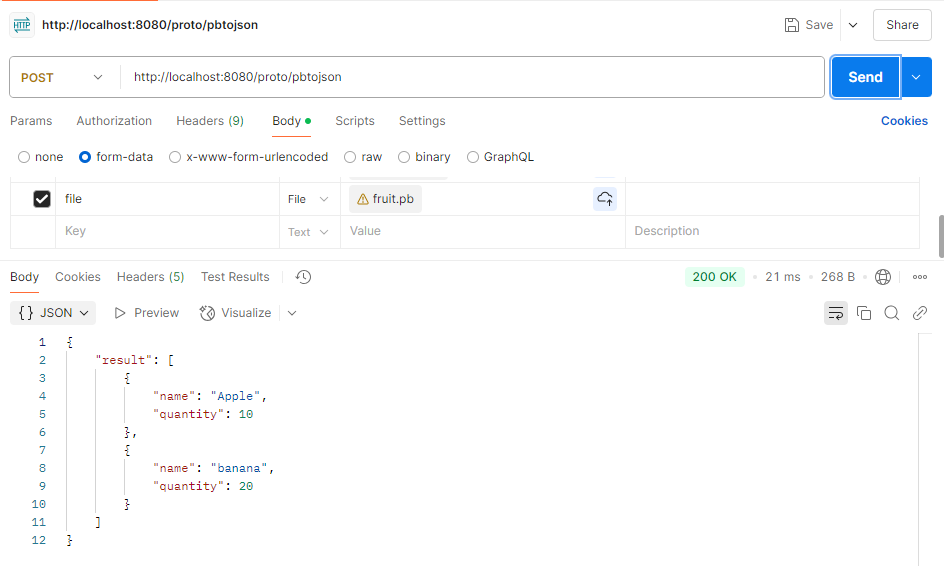
2) postman에 API 주소와 body에 파일을 추가합니다.
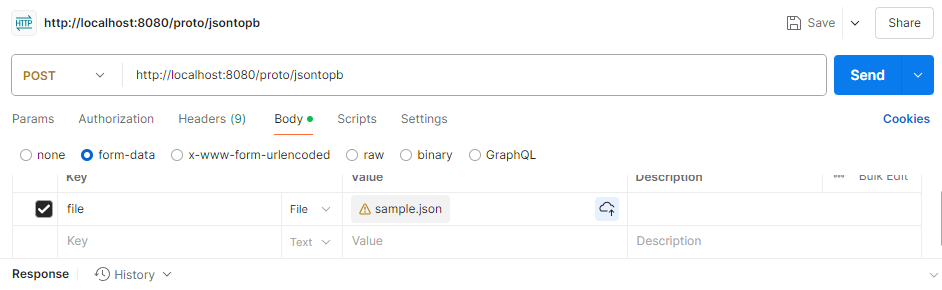
3) 이후 Protobuf 파일 확인 (다운로드 하셔도 됩니다)

4) 반대의 케이스도 test 해보겠습니다 (Protobuf -> Json)
# 2. ProtoBuf 사용법 (DynamicMessage)
만약 .proto 파일을 컴파일한 파일을 공유하지 않고, 직접 클래스를 만들어 작성한다면 어떻게 해야할까요?
.proto 파일을 이용할 경우 미리 데이터 구조를 정의한 뒤 컴파일한 Java 클래스를 이용하게 됩니다.
이와 반대로, DynamicMesssage는 동적인 방식으로 런타임에 메시지를 생성하게 되는데요! 이 때 Descriptor를 이용하게 됩니다.
DynamicMessage
getField public java.lang.Object getField(Descriptors.FieldDescriptor field) Obtains the value of the given field, or the default value if it is not set. For primitive fields, the boxed primitive value is returned. For enum fields, the EnumValueDescript
protobuf.dev
1. proto 파일의 역할을 하는 클래스 생성
public class PBDynamicDescriptor {

    //google protobuf : DynamicMessage API
    public static Descriptors.Descriptor getDescriptor() throws Descriptors.DescriptorValidationException {

        DescriptorProtos.DescriptorProto fruitDescriptor = DescriptorProtos.DescriptorProto.newBuilder()
                .setName("Fruit")
                .addField(DescriptorProtos.FieldDescriptorProto.newBuilder()
                        .setName("name")
                        .setNumber(1)
                        .setType(DescriptorProtos.FieldDescriptorProto.Type.TYPE_STRING))
                .addField(DescriptorProtos.FieldDescriptorProto.newBuilder()
                        .setName("quantity")
                        .setNumber(2)
                        .setType(DescriptorProtos.FieldDescriptorProto.Type.TYPE_INT32))
                .build();


        DescriptorProtos.DescriptorProto resultDescriptor = DescriptorProtos.DescriptorProto.newBuilder()
                .setName("Result")
                .addField(DescriptorProtos.FieldDescriptorProto.newBuilder()
                        .setName("result")
                        .setNumber(1)
                        .setType(DescriptorProtos.FieldDescriptorProto.Type.TYPE_MESSAGE)
                        .setLabel(DescriptorProtos.FieldDescriptorProto.Label.LABEL_REPEATED)
                        .setTypeName("Fruit"))
                .build();

        Descriptors.FileDescriptor fileDescriptor = Descriptors.FileDescriptor
                .buildFrom(DescriptorProtos.FileDescriptorProto.newBuilder()
                        .addMessageType(fruitDescriptor)
                        .addMessageType(resultDescriptor)
                        .build(), new Descriptors.FileDescriptor[]{});

        return fileDescriptor.findMessageTypeByName("Result");

    }
}
2. Test를 위한 Controller 클래스
PBDynamicController {

    private final ObjectMapper objectMapper;

    @PostMapping(value = "/jsontopb", consumes = MediaType.MULTIPART_FORM_DATA_VALUE)
    @Operation(summary = "JsonToPb", description = "json을 pb로 변환해줍니다")
    public ResponseEntity<?> getJsonToPb(@RequestPart("file") MultipartFile file) {

        log.info("========== Protobuf Dynamic Message start ==========");

        try {
            JsonNode jsonNode = objectMapper.readTree(file.getBytes());
            Descriptors.Descriptor descriptor = PBDynamicDescriptor.getDescriptor();
            DynamicMessage.Builder builder = DynamicMessage.newBuilder(descriptor);
            JsonFormat.parser().merge(jsonNode.toString(), builder);
            DynamicMessage dynamicMessage = builder.build();

            return ResponseEntity.ok()
                    .header(HttpHeaders.CONTENT_DISPOSITION, "attachment; filename=fruit.pb")
                    .contentType(MediaType.APPLICATION_OCTET_STREAM)
                    .body(dynamicMessage.toByteArray());

        } catch (IOException | Descriptors.DescriptorValidationException e) {
            log.error(e.getMessage());
            return ResponseEntity.badRequest().body("fail to parse");
        }
    }

    @PostMapping(value = "/pbtojson", consumes = MediaType.MULTIPART_FORM_DATA_VALUE)
    @Operation(summary = "PbToJson", description = "PB을 Json로 변환해줍니다")
    public ResponseEntity<?> getPbToJson(@RequestPart("file") MultipartFile file) {

        log.info("========== Protobuf Dynamic Message start ==========");

        try {
            byte[] pbFile = file.getBytes();
            Descriptors.Descriptor descriptor = PBDynamicDescriptor.getDescriptor();
            DynamicMessage dynamicMessage = DynamicMessage.parseFrom(descriptor, pbFile);
            String message = JsonFormat.printer().print(dynamicMessage);

            return ResponseEntity.ok()
                    .contentType(MediaType.APPLICATION_JSON)
                    .body(message);

        } catch (IOException | Descriptors.DescriptorValidationException e) {
            log.error(e.getMessage());
            return ResponseEntity.badRequest().body("failed to parse");
        }
    }

}
3. Postman Test
1) Json -> Pb
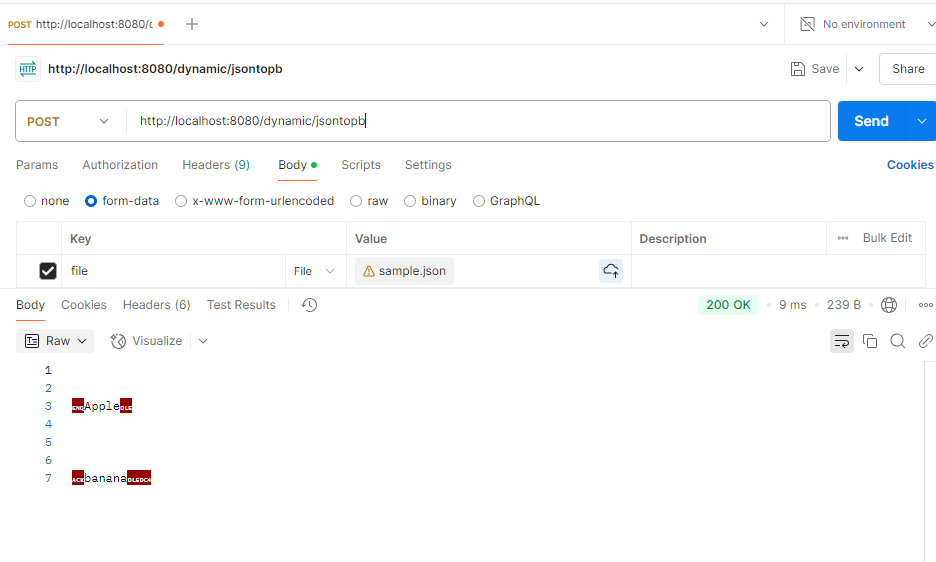
2) Pb -> Json

사용 방식 2가지의 차이점을 테이블로 정리해봤습니다~!!
| .proto 파일 기반 | DynamicMessage | |
| Schema | .proto 파일을 미리 정의 | 런타임에 동적 생성 |
| Using | proto 파일을 protoc를 이용하여 Java 클래스 생성 및 이용 | DynamicMessage.newBuilder()를 이용 |
| 속도(상대적) | 빠름 | 느림 |
잘못된 내용의 경우 댓글로 남겨주시면, 수정하도록 하겠습니다.
References
2. Protocal Buffer Basics: Java (Tutorial)
3. [Protocol Buffer] 프로토콜 버퍼 설치하기(Windows)
4. 말로만 듣던 Protobuf, 드디어 써봤습니다.
5. Protobuf란?
'Backend > Spring' 카테고리의 다른 글
| [Spring/AI] Spring AI를 활용하여 가볍게 영작하기 (0) | 2025.03.24 |
|---|---|
| [Spring/Architecture] Rate Limiter (처리율 제한 장치) - too many requests (1) | 2025.03.23 |
| [Spring Cloud] Spring Cloud Data Flow (local_ver) (0) | 2025.02.17 |
| [Spring] JSON : Jackson, Gson (0) | 2025.01.07 |
| [Spring] Filter, Interceptor (0) | 2024.12.21 |